Stop Managing Sprints.
Start Shipping.
The project tool for lean teams that want fewer meetings, faster releases, and instant client clarity.
No credit card required · Free for unlimited team members
Sound familiar?
Most project tools create friction instead of flow.
"The tool became the job"
Workflows, automations, custom views, 40 fields per ticket - your project tool needs its own full-time admin.
"Jira is prison. Notion is chaos."
Enterprise tools force process you don't need. Blank-canvas tools give zero structure. There's no middle ground.
"We just accept it at this point"
Grooming, planning, retros - your team spends more energy maintaining the system than shipping the product.
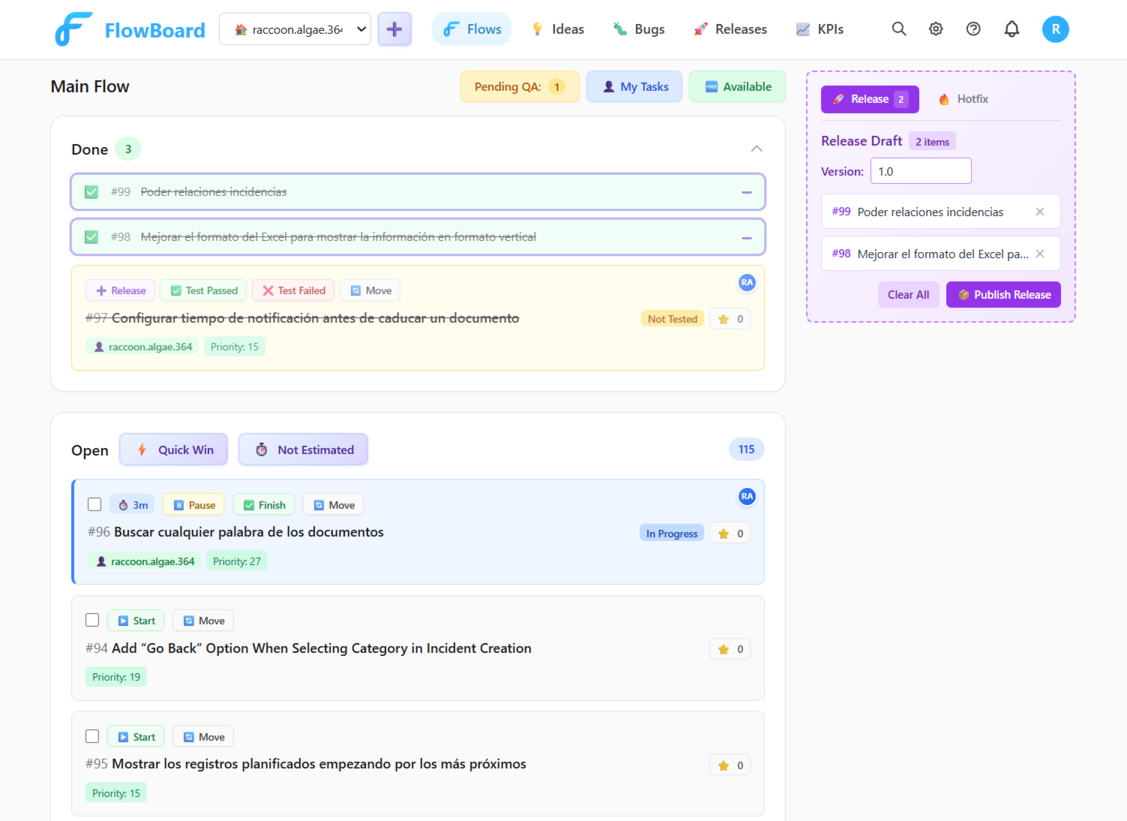
FlowBoard was built to fix this. One flow. One truth. One place to look.
Built for Speed and Control
Three core principles that replace your entire project management stack.
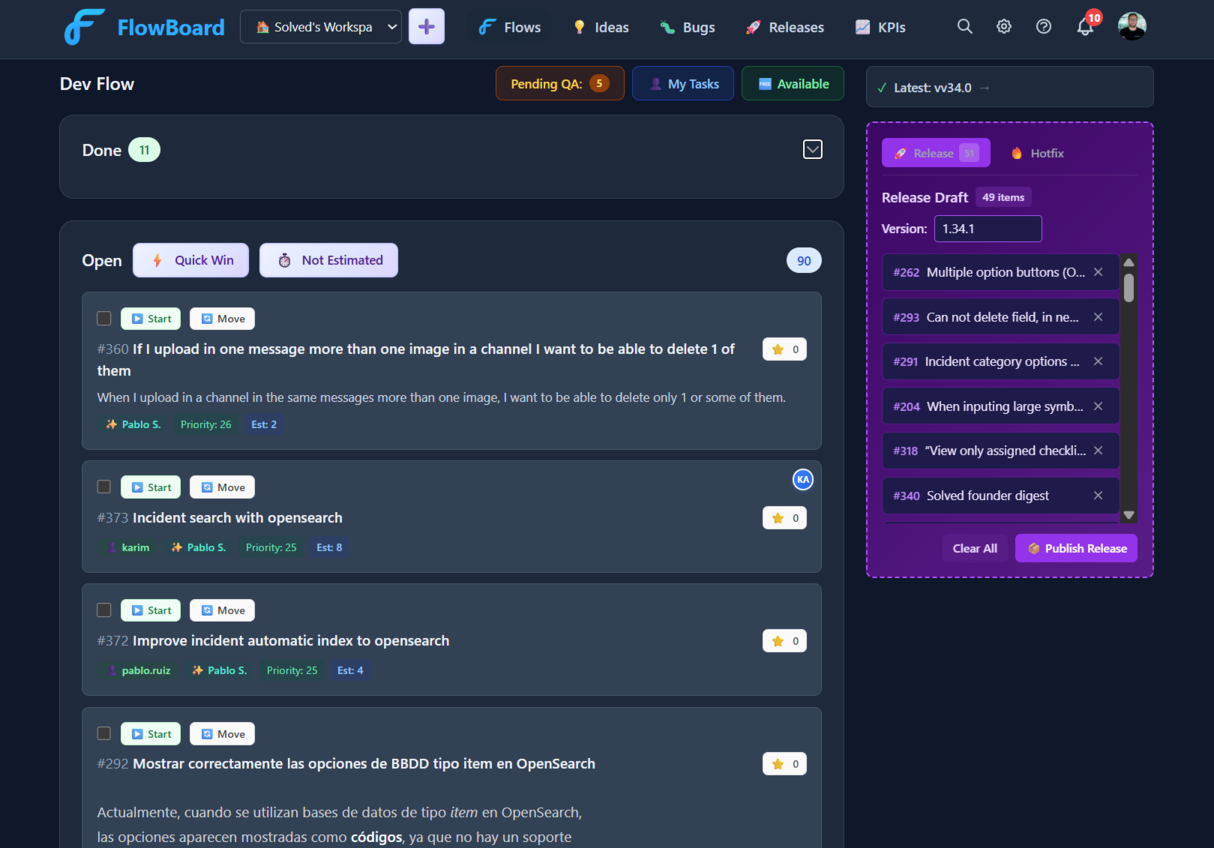
Single Flow Board
One prioritized list replaces your kanban columns, sprint backlogs, and scattered boards. Drag to reprioritize. Work flows top-down.
Auto Changelogs
Draft releases as you go, add tasks flexibly, and publish whenever you're ready. Polished changelogs generated instantly - no copy-pasting commits.
AI Agent Automation
Claude picks bugs from your backlog, writes fixes, and creates merge requests. Your backlog shrinks while you sleep.
How It Works
Create a workspace
Sign in with Google, name your workspace, and invite your team. Up and running in under a minute.
Define your flow
Set your priority formula, pick visible fields, and add tags. Smart defaults mean you can skip this entirely.
Work continuously
Add tasks, set priorities, assign work. Everything flows top-down - no sprints, no columns, no ceremonies.
Draft & release
Build a release draft as you go, add tasks flexibly, and publish whenever you're ready. Changelog generated instantly.
Everything Else You Need
Beyond the core flow, FlowBoard handles the rest.
Team KPIs
Track velocity and workload. Built-in, not bolted on.
Ideas Inbox
Clients submit ideas. You decide what joins the flow.
Flexible Releases
Build release drafts at your pace, publish when ready.
GitHub & GitLab
Auto-link PRs to tasks. Tasks close when PRs merge.
Slack & Teams
Get notifications in Slack or Teams when tasks change.
Real-Time Sync
See changes instantly across your team. No refresh needed.
Custom Priority
Define what "important" means: impact + effort + clients.
Bug Tracking
Guided wizard, AI insights, and environment tagging built in.
AI Integration (MCP)
Let Claude, Cursor, or any AI tool manage tasks via the MCP server.
Why Teams Switch to FlowBoard
If your current tool feels heavy, slow, or chaotic - you're not alone.
Jira is built for enterprises. You get admin overhead, mandatory workflows, and 40 fields per ticket. FlowBoard gives you one prioritized flow, zero setup, and releases in one click.
ClickUp does everything - and that's the problem. 15 views, nested spaces, laggy UI. FlowBoard is fast, focused, and intentionally simple.
Notion is a blank canvas. Great for docs, not for shipping. No built-in releases, no priority flow, no QA visibility. FlowBoard gives you just enough structure to keep moving.
Linear is clean - but dev-only. No client-facing releases, no changelog communication, limited non-dev access. FlowBoard bridges dev work and product delivery.
What Teams Are Saying
"We went from a messy Notion board to shipping real releases in a week. Everything just clicks - tasks, QA, changelogs."
"Release day went from half a day to 10 minutes. Freeze the flow, generate a changelog, send it to clients. Done."
"The KPI dashboard shows me who's shipping and what's stuck without asking anyone. We dropped our daily standup entirely."
Connects to Your Workflow
Plug into the tools your team already uses.
All integrations included free on every plan.
GitHub
Auto-link branches to tasks. Tasks move to Done when PRs merge.
GitLab
Same branch linking and auto-close for GitLab merge requests.
Slack
Create bugs with /flowboard. Get notifications in your channels.
Microsoft Teams
Log bugs and ideas from Teams. Get updates in your channels.
Public Submission API — Let your users submit bugs and ideas from your own website or app. No FlowBoard account needed.
Simple Pricing
Start free, upgrade when you're ready
FREE
- 1 active workspace
- Up to 3 team members
- CSV exports
- KPI dashboard & analytics
- GitHub, GitLab, Slack & Teams
- Weekly reviews (Pro)
- AI-powered features (Pro)
PRO
Up to 10 seats included, then $5/seat/mo
- Up to 10 seats included
- Unlimited workspaces
- Everything in Free, plus:
- AI-powered features
- Weekly reviews
- API keys
30-day free trial · No credit card required · Cancel anytime
Frequently Asked Questions
Everything you need to know before getting started.
What is "continuous flow" and how is it different from sprints?
Is there a free trial? Do I need a credit card?
Can I cancel anytime?
What integrations are included?
How does the AI feature work?
Is my data secure?
How many team members can I have?
What happens when my trial ends?
Built for teams that ship
Ready to Move Faster?
Skip the process. Start the progress. No sprints, no chaos, just flow.