One Week with Weekly Commitments: Monday to Friday, Step by Step
A day-by-day walkthrough of weekly commitments in FlowBoard: the Monday declaration, the Wednesday check-in and summary, and the Friday close-out.

Founder of FlowBoard · Full-stack developer & serial entrepreneur
Before the week: fifteen minutes of setup
This guide assumes weekly commitments are on. If they are not, an admin does it once under Settings, Commitments.
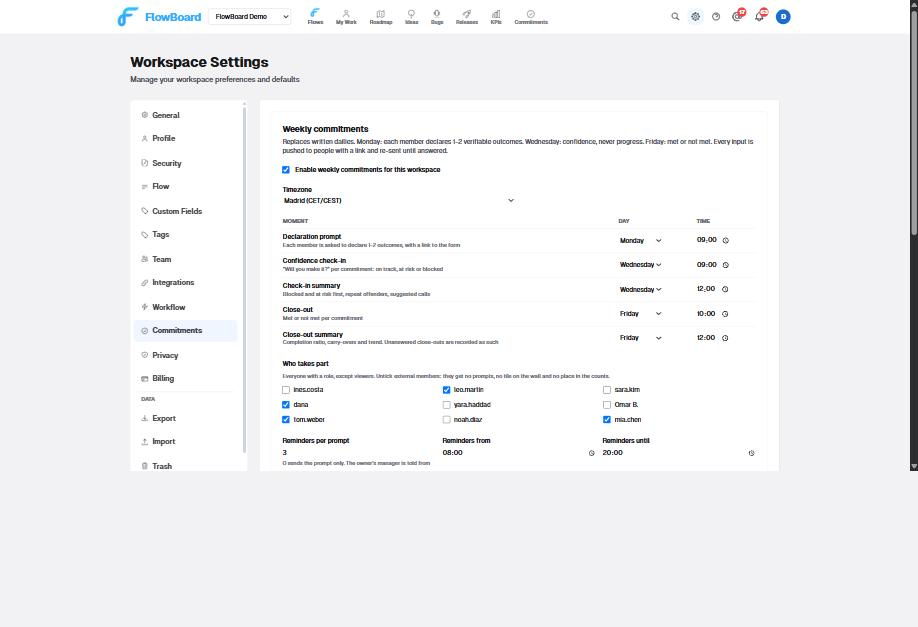
- Enable weekly commitments and pick the timezone.
- Set the five slots. The defaults are Monday 09:00 (declaration prompt), Wednesday 09:00 (check-in), Wednesday 12:00 (check-in summary), Friday 16:00 (close-out) and Friday 18:00 (close-out summary). Our own team closes out on Friday morning because the weekly review is at lunch.
- Untick anyone who should not take part. Viewers never do. External members stay out of the prompts, the wall and the counts.
- Leave the reminders at three per prompt, hourly, between 08:00 and 20:00, unless you know better.
- Pick the team channel. That one choice routes declarations, answers, results and summaries. Then run Sync users under Integrations, and set Reports To for every member under Team.
Post the announcement in the channel. The Academy article "Weekly commitments" has a template. The important sentence in it: Wednesday asks whether you will make it, never what you did.
Monday 09:00: the prompt arrives
Each participant gets "Declare your commitments for this week" as a Slack DM with a button, and the same in-app and by email with a link, unless prompt delivery is set to Slack only. The link opens the declare deck.
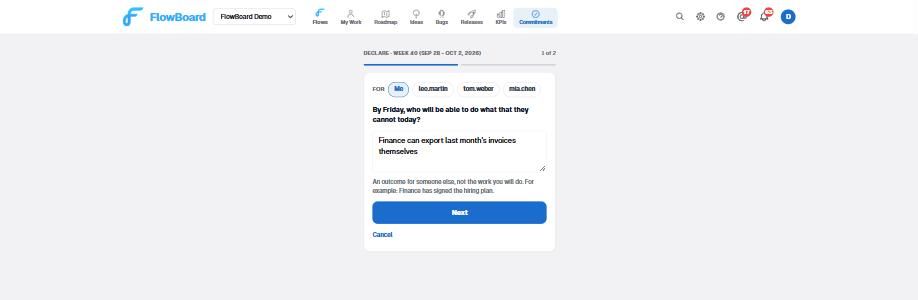
Screen one asks: by Friday, who will be able to do what that they cannot today? Answer with someone else in the sentence. Good: "Finance can export last month's invoices themselves." Bad: "Finish the export." If it reads like work, the form will say "That reads like work, not an outcome. What can someone do once it is done?" You can keep it anyway.
Screen two asks who will notice, and how. Pick a chip: a person who confirms it, a link, a number, a board task, or your own line. It is optional. Tap Declare, and the finish card shows the commitment as the team will see it, with "Declare another".
Do this inside the Monday kickoff, out loud, one person at a time. Correct task lists into outcomes as you go. A manager can declare for a report using the "For" chips on the first screen, and the report can renegotiate it later. Two commitments each is plenty. One is fine.
The declaration is posted to the channel the moment it is saved, and the person's reminders stop. Anyone who has not declared by 10:00 gets reminder 1. By 11:00, reminder 2, and their manager gets a note. By the check-in slot the declaration window closes.
Tuesday: nothing
No prompt, no reminder, no update to write. The board carries the work. If a commitment stops making sense on Tuesday, open the wall, tap Renegotiate on your tile, change the outcome or the evidence with a reason, and the change is posted to the channel. Or Withdraw it, also with a reason. A withdrawn commitment counts neither as met nor as not met.
Wednesday 09:00: will you make it?
Each owner gets one Slack message per open commitment with three buttons: on track, at risk, blocked. On track is one click and you are done. At risk or blocked opens a modal with one field, "What is in the way?". One line is enough. Your manager reads it at the summary.
Without Slack, the email or in-app link opens the check-in deck: one commitment per screen, the same three answers, a reason field for yellow and red, then a finish card with the time it took and what comes next. Already answered a commitment from Slack? The link skips it.
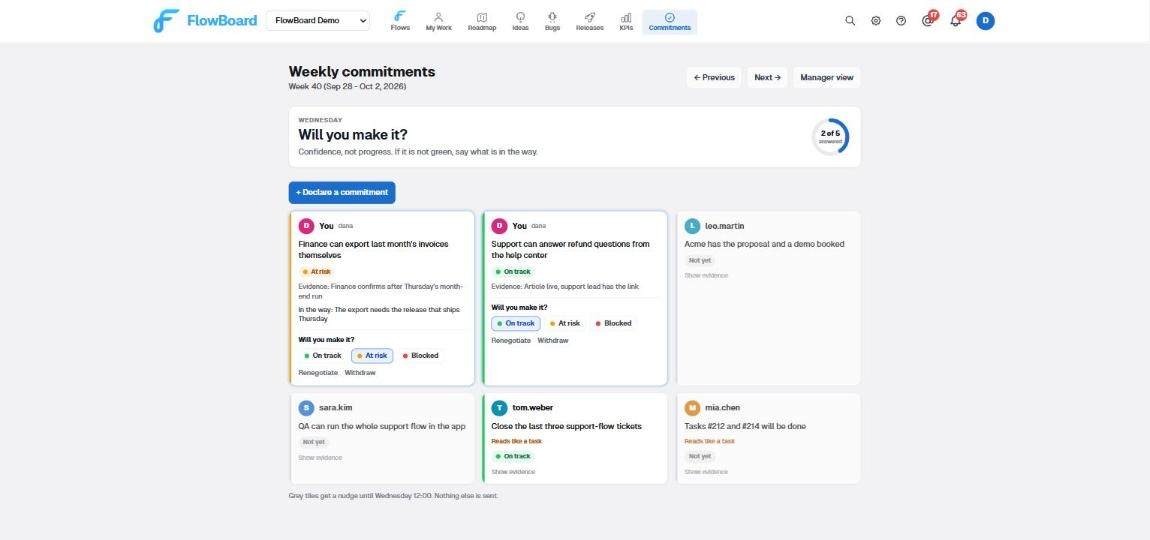
The wall shows the team's state at a glance. The ring counts people, not commitments. Your tiles come first and carry the buttons; teammates' tiles show their answer and hide the evidence behind "Show evidence". Grey means not yet. A small "Reads like a task" mark appears for managers on a tile whose outcome looks like work, so Monday's rewrite conversation has a target.
Reminders run the same way as Monday: hourly until noon, manager told from the second one.
Wednesday 12:00: the manager reads the summary
The channel gets the team summary and each manager gets a DM scoped to their own reports: blocked first with reasons, then at risk, then the on-track count, then "Not checked in" and "Not declared this week". Only a commitment whose owner actually answered counts as on track.
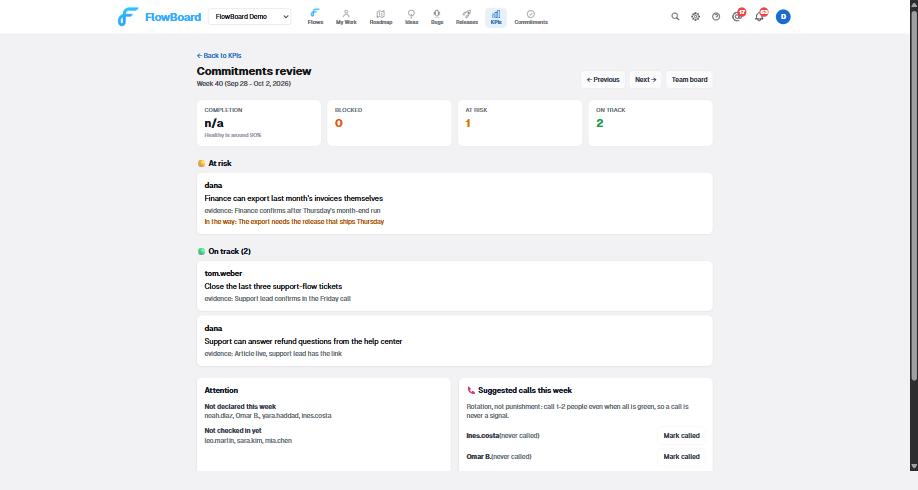
What to do with it, in order:
- Blocked: unblock today. That is the whole reason the reason field exists.
- At risk: decide whether to help or to renegotiate. Say so to the person; do not wait for Friday to find out.
- At risk two weeks running for the same reason: the commitment is wrong, not the person. Reshape it on Monday.
- Not checked in: the reminders will handle it until noon. After noon it is recorded as unanswered, so do not chase; read it on Friday.
- Suggested calls: call the one or two people named, including when they are green. Press "Mark called" so next week suggests someone else. This is the rule that keeps a call from becoming a signal.
Thursday: still nothing
Renegotiation stays open until the close-out slot. If Thursday afternoon makes it clear that a commitment will not land, renegotiate it now rather than mark it not met tomorrow. The team sees the change and the reason. That is the point.
Friday 16:00: did it happen?
One Slack message per commitment, two buttons: met, not met. Nothing to write. The same two buttons on the wall and in the close-out deck. Anything still unanswered at the summary time is recorded as unanswered, which is shown apart from not met and counts against the ratio.
A commitment marked not met shows "Carry to next week" on its tile. Carrying creates next week's commitment linked to this one, so the two-week limit applies: a third consecutive week is refused with an explanation.
Friday 18:00: the numbers
The close-out summary reaches the channel and each manager: completion as met over met plus not met plus unanswered, with renegotiated shown separately; the carry-overs; the trend over recent weeks; and the two flags. "Committing below capacity" means four or more weeks at 100%. "Sustained drop" means under 70% two weeks running.
Read it in the weekly review, and talk about the renegotiations before the misses. A team that renegotiated twice and met everything else had a good week. A team at 100% for the fourth week is promising less than it can deliver. Around 90% is where you want to be.
The manager view keeps every week. The trend chart with the 90% band appears after the first Friday, and "Previous" walks back through the history.
What people actually typed in the first week
Because it helps to see the difference:
- "Tasks #212 and #214 will be done." Reads like a task. The work is on the board already; the commitment adds nothing.
- "Close the last three support-flow tickets." Same thing with a verb. What can someone do once they are closed?
- "QA can run the whole support flow in the app." An outcome. QA is the person who will notice, and the evidence is that they ran it.
- "Acme has the proposal and a demo booked." An outcome with two pieces of evidence built in.
Nobody gets blocked for typing the first two. The form nudges, the manager sees a mark, and the Monday conversation fixes it. By the second week the task lists were gone.
Where to go next
Everything above is configurable and the reasoning behind each rule is in why we replaced written dailies with weekly outcome commitments. The feature overview, including the API and the Slack-only delivery mode, is in weekly commitments in FlowBoard. To run a week by hand before turning anything on, use the free weekly commitments tool.
Ready to Try FlowBoard?
Start managing your projects with continuous flow. No sprints, no bloat - just ship.
Get Started FreeKeep reading
Weekly Commitments in FlowBoard: Slack Prompts, Manager Escalation and the Friday Completion Ratio
FlowBoard now runs the weekly commitment ritual for you: Slack prompts with buttons, reminders that escalate to the manager, and two summaries a week.
Team ManagementWhy We Replaced Written Dailies with Weekly Outcome Commitments
Written dailies repeat the board and nobody reads them. We replaced them with one outcome a week, a confidence check on Wednesday and a close-out on Friday.
Best PracticesThe Weekly Review: A Simple System for Staying on Track Without Daily Standups
Replace daily standups with a weekly review. A simple process for checking progress, resetting priorities and planning the week without daily meetings.
TutorialBuild Your Own AI Coding Agent with FlowBoard's API
Step-by-step tutorial for building a custom AI coding agent that reads tasks from FlowBoard, writes code, and creates pull requests automatically.