Weekly Commitments in FlowBoard: Slack Prompts, Manager Escalation and the Friday Completion Ratio
FlowBoard now runs the weekly commitment ritual for you: Slack prompts with buttons, reminders that escalate to the manager, and two summaries a week.

Founder of FlowBoard · Full-stack developer & serial entrepreneur
One promise a week, run by the tool
Weekly commitments replace written dailies with three touchpoints: each person declares one or two outcomes on Monday, answers "will you make it?" on Wednesday, and closes out met or not met on Friday. We wrote about why we switched. This post is about what FlowBoard does for you once you turn it on.
The short version: every input the team owes arrives as a Slack message with buttons, comes back as a reminder until answered, reaches the person's manager if it keeps being ignored, and rolls up into two manager summaries a week. Nobody chases anyone, and nobody writes a status report.
Monday: declare an outcome, not a task
At the time you set, each participant gets a prompt with a link. It opens a deck of two questions, one per screen. The first is "By Friday, who will be able to do what that they cannot today?", with an example drawn from the person's role. The second, "Who will notice, and how?", is answered with a chip: a person, a link, a number, a board task, or a line of your own. It is optional.
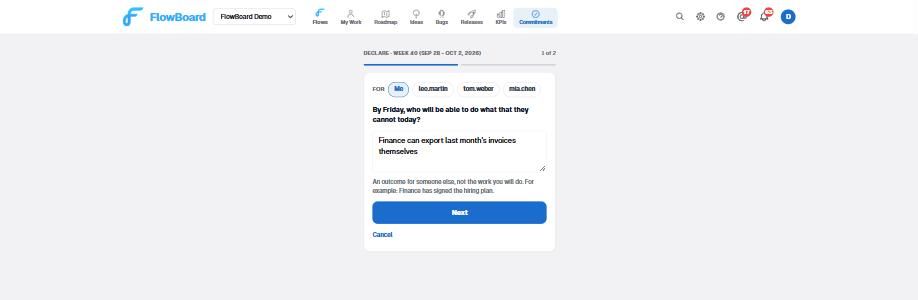
If the text still reads like work, with task numbers or "will be done", the form says so and lets you keep it anyway. Managers can declare for a report from the same screen, and the report can renegotiate it. There is no cap and no due day: one or two is the advice, and the week is the deadline.
Every declaration is posted to the team channel, so the whole team sees everyone's commitments before Monday is over.
Wednesday: three buttons in Slack
On Wednesday morning each owner gets one Slack message per open commitment: on track, at risk, blocked. Green is a single click. Yellow and red open a modal with one field, "what is in the way?", because that is the only information a manager can act on. The wording asks for confidence, never for progress.
The same message carries a link to the in-app deck for people without Slack, and every answer is posted to the team channel. If a commitment has stopped making sense, "Renegotiate instead" sits right under the buttons.
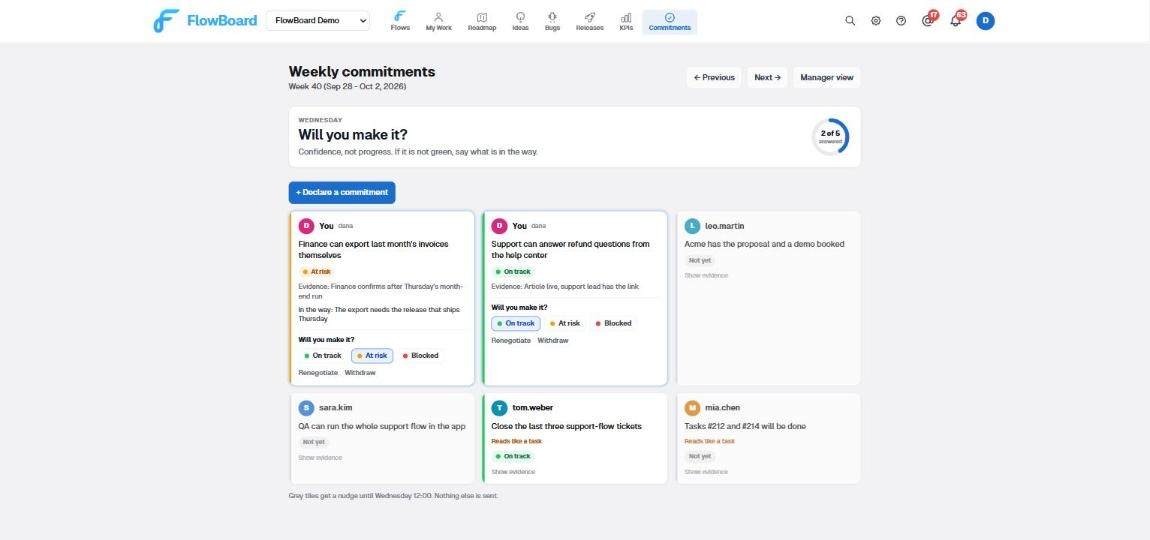
The wall at /commitments shows the same thing for the whole team: the question of the
moment, a ring of how many people have answered it, your commitments first, and one tile per
teammate commitment. A grey tile means "not yet". It never means "late".
Reminders that escalate instead of nagging
An unanswered prompt is re-sent at the interval you choose, inside the hours you choose, up to the number of reminders you choose. The defaults are hourly, between 08:00 and 20:00, three times. The prompt and the first reminder also go in-app and by email. Later reminders stay on Slack, so an unanswered week does not become an inbox full of the same message.
From the second reminder, the owner's manager gets a separate message: "X has not checked in yet", asking for a word, not an answer. Reminders stop at the cut-off: the check-in slot for declarations, the summary time for check-ins and close-outs. Whatever is still unanswered is recorded as unanswered and named in the summary, and an unanswered close-out counts against the completion ratio. Not answering is not a free pass.
Workspaces that live in Slack can set prompt delivery to Slack only: anyone the DM reaches gets no in-app, email or push copy, and anyone Slack cannot reach keeps all of them.
Two manager summaries a week, without asking
At the check-in summary time, the team channel gets the picture: blocked first with their reasons, then at risk, then the on-track count, then who has not checked in and who has not declared. Only a commitment whose owner actually answered counts as on track. A declared-and-silent commitment is listed as not checked in, never as green.
Each manager also gets the same summary by DM, scoped to their own reports, based on the "Reports To" field in Team settings. It flags anyone at risk two weeks running for the same reason, and it suggests one or two people to call this week, least recently called first, even when everything is green. A call from the manager should never read as a signal.
The Friday summary adds the completion ratio (met over met plus not met plus unanswered, with renegotiated shown separately), the carry-overs, the trend over recent weeks, and two flags: "committing below capacity" for four or more weeks at 100%, and "sustained drop" for under 70% two weeks running.
The manager view
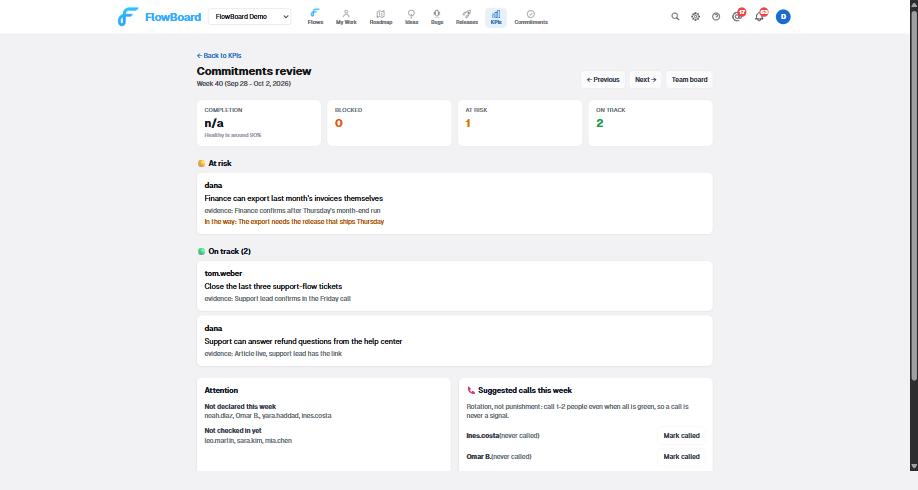
Under KPIs, /kpi/commitments shows the current week with blocked, at risk and on
track in that order, each with owner, outcome, evidence and blocker reason. An attention card lists
repeat at-risk owners, who has not declared, who has not checked in, and the capacity flags. The
suggested-calls card has a "Mark called" button so the next suggestion goes to someone else. The
completion trend with the 90% band appears after the first Friday. Previous weeks are one click
back.
Renegotiate, withdraw, carry over
Any open commitment can be renegotiated or withdrawn until the close-out, from the wall or from the Wednesday deck, with a mandatory reason that is posted to the team. A withdrawn commitment is recorded as renegotiated and does not enter the ratio, so an honest mid-week correction never costs anyone.
On Friday, a commitment that was not met can be carried to next week from the same tile. It can be carried once. A third consecutive week is refused with an explanation, because by then it is either too big to be a commitment or not important enough to be one.
Setup in ten minutes
- Settings, Commitments: enable, choose the timezone and the five day-and-time slots, untick anyone who should not take part (external people stay out of prompts, wall and counts), set the reminder count, window and interval, and pick the team channel.
- Settings, Integrations: run Sync users so Slack buttons know which FlowBoard member clicked them.
- Settings, Team: set Reports To for each member. This is where the per-manager summaries and the escalated reminders go.
- Post the announcement. The Academy article "Weekly commitments" has one you can paste.
Recipients are never asked when declaring. The channel gets declarations, answers, results and summaries; each member gets their own prompts; each manager gets their own reports' summaries. Every routing row is still editable under Integrations if you want something different.
Also for agents, and also for free
The ritual is exposed through the API and the FlowBoard MCP server: list_commitments,
declare_commitment and update_commitment, acting on behalf of a member.
An AI agent that finished a week's work can declare next week's outcome for its human, and the
human can renegotiate it on Monday.
If you want to try the ritual before creating anything, the free weekly commitments tool runs in your browser with no account, generates the Monday, Wednesday and Friday Slack posts to paste, and can import its board into a FlowBoard workspace later. For a day-by-day walkthrough, read one week with weekly commitments.
Ready to Try FlowBoard?
Start managing your projects with continuous flow. No sprints, no bloat - just ship.
Get Started FreeKeep reading
Why We Replaced Written Dailies with Weekly Outcome Commitments
Written dailies repeat the board and nobody reads them. We replaced them with one outcome a week, a confidence check on Wednesday and a close-out on Friday.
TutorialOne Week with Weekly Commitments: Monday to Friday, Step by Step
A day-by-day walkthrough of weekly commitments in FlowBoard: the Monday declaration, the Wednesday check-in and summary, and the Friday close-out.
IntegrationsSlack & Teams Integration: Get Task Notifications Where You Work
Connect FlowBoard to Slack or Microsoft Teams for instant alerts when tasks are assigned, statuses change, comments land, or a release goes live.
ProductivityProject Notifications That Do Not Become Noise
Most tools give you one notification switch and a full inbox. Per-event, per-channel control plus a watch model that separates what you own from what you track.